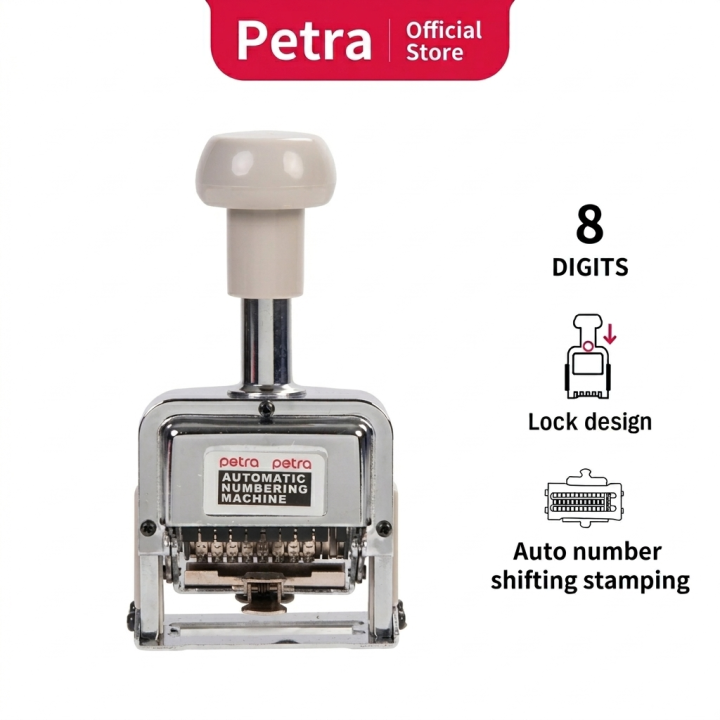
PETRA 8 Digit Auto Numbering Machine Self Inking Heavy Duty Metal Stamp
● 8 digit automatic numbering system● Self inking for clean impressions● Heavy duty metal construction● Smooth and efficient operation● Ideal for office and industrial use● Suitable for serial coding and tracking
৳1,150৳1,200Save 4%
In stock
1
Delivery to all 64 districts. Cash on delivery.
- Pay cash when it arrives, or bKash, Nagad and cards
- Original products, checked before packing
About this product
PETRA 8 Digit Auto Numbering Machine
Key Performance Specifications
- Digit Capacity: 8 rotating wheels allowing sequential serialization from 00000001 up to 99999999.
- Frame Build: High-strength stainless steel structure paired with a chrome polish finish to handle heavy impacts in warehouses and mailrooms.
- Inking System: Integrated self-inking felt cartridge that automatically inks the metal typefaces between every single compression.
- Ergonomics: Wide, shock-absorbing top handle that reduces palm strain during high-volume operations.
Advanced Movement Settings (Multi-Shift System)
The machine features an adjustable internal action-indicator lever. This permits the operator to set how many times a single number stamps before advancing to the next sequential digit:
- Consecutive (0): Advances by 1 on every single stamp (e.g., 1001, 1002, 1003).
- Repeat (0): Locks the current sequence to stamp the exact same number indefinitely.
- Duplicate (2): Stamps the same number twice before advancing (ideal for carbon copy or duplicate invoicing).
- Multi-Repeat: Configurable to shift digits automatically after 3, 4, 6, or 12 continuous impressions.
Step-by-Step Operation Guide
- Locking the Frame: Compress the handle halfway down and push the side lock button. This locks the digit wheels away from the ink pad for safe configuration.
- Setting the Starting Number: Use the included plastic stylus stick to rotate the metal wheels forward until your chosen starting number is aligned.
- Dropping the Ciphers (Leading Zeros): If you prefer to print 45 instead of 00000045, press the leading zero wheels slightly forward and downward using the stylus to drop them out of printing alignment.
- Priming the Ink: Slide out the ink pad cradle, apply 5–6 drops of oil-based metal stamping ink evenly across the pad surface, and slide it securely back into place.
- Stamping: Release the frame lock by firmly pushing the handle all the way down once. Align the base plate indicator rails with your document lines and stamp using a smooth, fluid vertical motion
Heavy Duty Metal Stamp


Before you order, please read our Shipping & Delivery and Return & Refund Policy.
Ratings and reviews
No reviews yet. Bought this? Be the first to review it.